Binary File Information Gathering Tools
Table of Contents
Binary File Information Gathering Tools
Overview
To do a good job, one must first sharpen one’s tools. In the process of binary code analysis, it is necessary to use some tools to collect information about binary code.
This article is used to record some command-line tools for inspecting binary file information. It will include: nm , ldd , strings , ps , strace , ltrace , ROPgadget , objdump , readelf, mainly documenting some potentially useful parameters and explanations of their output.
Tool List
nm
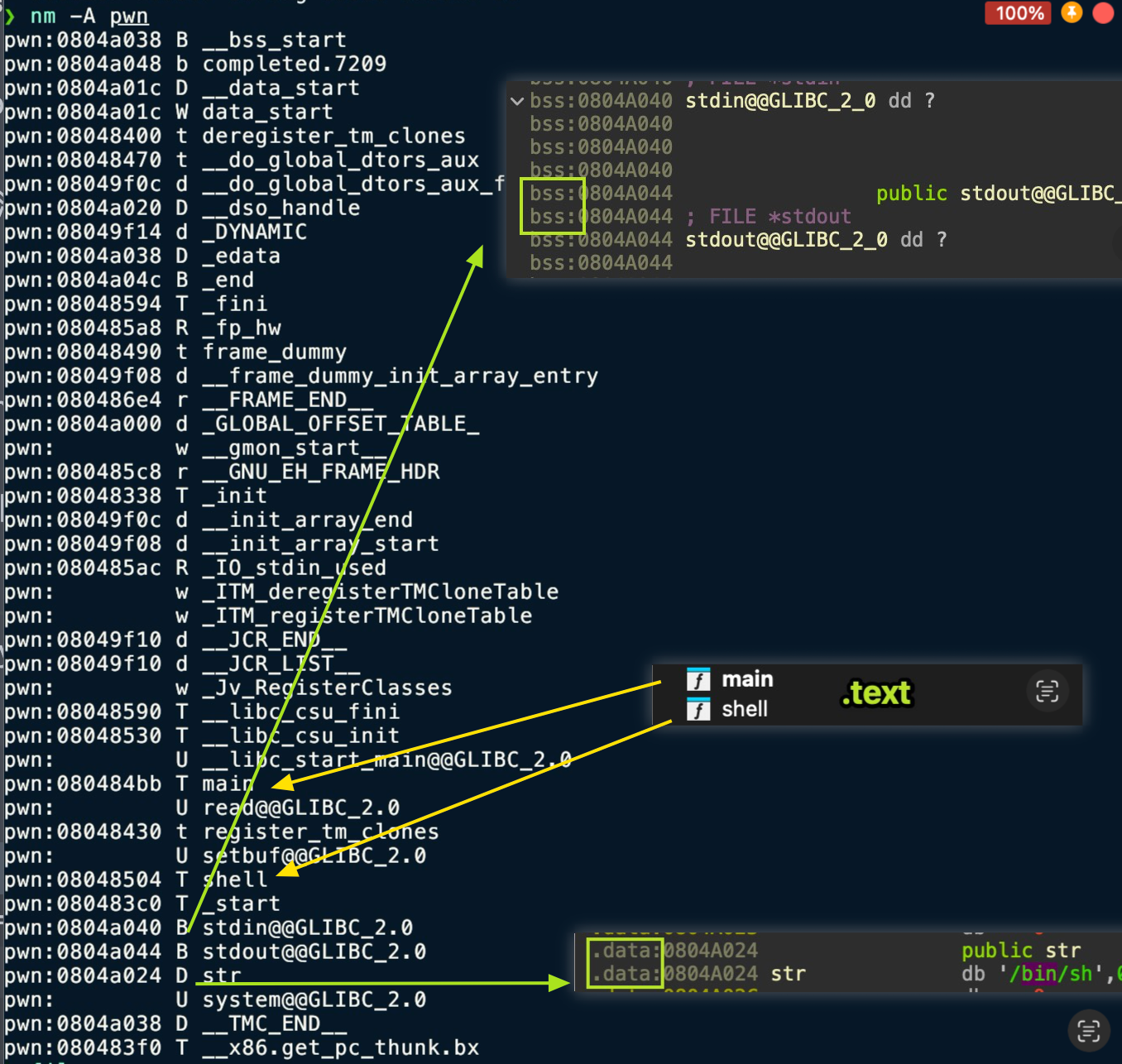
nm is used to inspect the symbol table in a binary file, including functions, global variables, undefined symbols, and so on. In exploit development and reverse engineering, it can be used to find function addresses, determine whether symbols have been stripped, analyze linking, and more.
Common Parameters
nm <file>
View the file’s symbol table (by default showing only symbol name + type + address).nm -D <file>
View the dynamic symbol table (.dynsym), suitable for ELF shared libraries and dynamically linked executables.nm -g <file>Show only global symbols.nm -a <file>
Show all symbols, including debug symbols.nm -S <file>
Show symbol sizes (the Size field).nm -u <file>
Show only undefined symbols, which are usually dynamic linking dependencies.nm --no-sort <file>
Output symbols in their original order (without sorting by address).
Common Symbol Type Descriptions
The second column in nm output is the symbol type (section type), and the common meanings are as follows:
| Letter | Meaning |
|---|---|
| T / t | Symbol in the Text section (code section) (T = global, t = local) |
| D / d | Symbol in the Data section |
| B / b | BSS section (uninitialized data) symbol |
| R / r | Read-only data section symbol |
| U | Undefined symbol (requires an external library to resolve) |
| W / w | Weak symbol |
| A | Absolute symbol (address does not change during linking) |
| V / v | Weak object |
In PWN, the most commonly used ones are:
T/t: find function locations
U: determine linking dependencies
B/D: analyze global variables and GOT/data structure locations
ldd
ldd is used to inspect which shared libraries an ELF executable will load at runtime, as well as the actual resolved path and base address (load address) of each library. In exploit development, it is used to determine the libc version, check whether a custom loader is used, and identify whether there is a controllable library hijacking scenario.
Common Parameters
ldd <file>
View the list of runtime dynamic library dependencies for an ELF file; this is the most commonly used form.LD_TRACE_LOADED_OBJECTS=1 <file>
Equivalent toldd, but does not actually run the target program, making it safer.
⚠️ Note: In some cases,
ldd <file>may actually “execute” the ELF file’s initialization logic, so caution is required when using it on malicious samples.
Recommended usage: `LD_TRACE_LOADED_OBJECTS=1 ./executable
Output Example and Explanation
$ ldd ./pwnlinux-vdso.so.1 (0x00007fffffffe000)libc.so.6 => /lib/x86_64-linux-gnu/libc.so.6 (0x00007ffff7a0d000)/lib64/ld-linux-x86-64.so.2 (0x00007ffff7dd0000)Field meanings:
linux-vdso.so.1: a virtual dynamic shared object provided by the kernel, not a real filelibc.so.6 => /lib/.../libc.so.6
the actual resolved path of the shared library(0x00007ffff7a0d000)
the runtime load base address (randomized on each launch under ASLR)
Common Uses in PWN
-
Confirm the libc version
In exploit development, you must know the libc version to match the correct offsets. -
Confirm whether the program uses its bundled libc
For example:
libc.so.6 => ./libc-2.31.soThis indicates that a dedicated libc is placed in the program directory (common in challenges). -
Check the program’s loader/dynamic linker
[Requesting program interpreter: ./ld-2.31.so]→ Combine withreadelf -l(mentioned later) for further confirmation. -
Debug path issues
When “not found” appears, it can be used to analyze issues such as incorrectLD_LIBRARY_PATHconfiguration. -
Library Hijacking analysis
It can be used to determine whether there is an opportunity to exploit RPATH, RUNPATH, or LD_PRELOAD.
Common Error Messages
-
not found
libmylib.so => not foundThis indicates that the system cannot resolve the library, usually due to a path issue. -
statically linked
not a dynamic executableThis indicates that the ELF uses static linking (such as musl builds), so dependencies cannot be inspected with ldd.
strings
strings is used to extract printable strings (ASCII/UTF-8) from binary files, including program string literals, logs, commands, paths, format strings, and so on. In exploit development, it is often used to quickly locate key function names, debug information, sensitive paths, and flag clues.
Common Parameters
strings <file>
Scan the entire file for printable strings; the most commonly used form.strings -n <num>
Set the minimum string length (default is 4).
For example:strings -n 3 a.outstrings -d <file>
Extract strings only from the data section.strings -e <enc>
Specify the encoding (such as s=7bit, S=8bit, b=big-endian, l=little-endian).strings -t x <file>
Display the offset of the string in the file before outputting it (hexadecimal).
Commonly used to locate string positions together with reverse engineering.
Common Output Type Descriptions
The information that strings can extract includes but is not limited to:
| String Type | Example | Use |
|---|---|---|
| Debug information | "Enter password:" | Quickly locate logic points |
| Path | "/bin/sh" | Clues for RCE / system exploitation |
| Format string | "%p %s %n" | Identify format string vulnerabilities |
| Error / log | "invalid length" | Cross-reference with the reversing process |
| Linked library name | "GLIBC_2.31" | Identify libc version |
| Compiler information | "GCC: (Ubuntu 9.4.0-1)" | Determine the competition environment |
Example Output Explanation
$ strings ./pwn/bin/shEnter your input:Correct!GLIBC_2.31putssystemAnalysis:
/bin/sh→ If this string appears in the program, there may be a call related to system(“/bin/sh”)Enter your input:→ Program I/O stream, corresponding to behaviorGLIBC_2.31→ libc version signature (extremely important)puts,system→ Dynamically linked symbol names, which can be combined with leaks to build ROP
Common Uses in PWN
- Search for the “/bin/sh” string
In ROP vulnerabilities, this is used to find the offset of/bin/shbuilt into libc or the binary. - Identify potentially dangerous API calls
Such as:system,sprintf,strcpy,gets, etc. → suggesting potential vulnerability points. - Find evidence of format string vulnerabilities
If outputs like"%x","%p","%n"appear, they can be further analyzed. - Quickly locate logic flow
Determine program behavior through strings such as"Wrong password"and"Try again". - Confirm libc version signatures
If the output contains manyGLIBC_2.xxstrings, they can be used to narrow down the libc version. - Assist reverse engineering
Corresponding strings → use IDA/objdump to trace references back and locate key functions.
readelf
readelf is one of the most comprehensive and professional tools for reading ELF format information. It parses ELF structures directly without depending on the system environment. Compared with objdump, readelf is more focused on data presentation, produces more precise output, and is better suited for binary analysis.
It is commonly used to inspect: program headers, section headers, dynamic information, symbol tables, relocation tables, program headers, interpreters (loaders), and more.
Common Parameters
-
readelf -h <file>
View the ELF file header (ELF type, architecture, entry address, etc.). -
readelf -l <file>
View the Program Headers, including load addresses, dynamic segments, and interpreter information. -
readelf -S <file>
View the section headers, which can be used to locate .text/.data/.got/.plt, etc. -
readelf -s <file>
View the symbol table (dynamic symbols + static symbols). -
readelf -r <file>
View the relocation table (essential for learning ROP), such as.rela.plt. -
readelf -d <file>
View the dynamic segment (DT_NEEDED, RPATH, RUNPATH, SONAME, etc.). -
readelf -a <file>
Output all information.
Output Content Explanation (Key Fields)
1. ELF header (-h)
Entry point address: 0x401080Type: EXEC (Executable file)Machine: Advanced Micro Devices X86-64- Entry address (possibly useful for ret2text)
- ELF type (EXEC / DYN → PIE determination)
- Architecture (64bit/32bit) Determine whether PIE is enabled:
Type: DYN → PIE 开启Type: EXEC → PIE 关闭2. Program Headers (-l)
LOAD 0x000000 0x400000 0x400000 0x2000 ...INTERP /lib64/ld-linux-x86-64.so.2DYNAMIC 0x401dd0 ...GNU_RELRO 0x401000 ...Key fields:
- INTERP: shows the loader (ld.so)
→ Combine with ldd to confirm whether a bundled loader is used - LOAD: load segment addresses, reflecting the memory layout
→ For ret2text, pay attention to the starting address of executable segments - GNU_RELRO / GNU_STACK:
→ Used to determine protections: RELRO, NX, and whether STACK protections are enabled
3. Section Headers (-S)
Mainly used to locate key sections:
.text 可执行代码区域.data 可写数据.bss 未初始化变量.plt Procedure Linkage Table.got Global Offset Table.got.plt 延迟绑定 GOT.init_array 程序启动时调用(构造函数).fini_array 程序退出时调用(析构函数)In PWN:
.pltis used for ROP calls to functions such as puts/printf.gotis used for leaking addresses (GOT overwrite).fini_arrayis used to control the program execution flow —> [[[CISCN 2019 Southwest]PWN1]]
4. Symbol Table (-s)
Example:
0000000000401030 system@plt0000000000401040 puts@plt0000000000404020 __libc_start_mainUses:
- Find actual function / plt locations
- Determine whether certain functions are exported (for example, if there is no system@plt → ret2libc must leak libc)
- Reverse engineer to find function names
Statically linked files will show a large number of symbols here.
5. Dynamic Segment (-d)
Example:
(NEEDED) Shared library: [libc.so.6](RPATH) Library rpath: [/home/pwn/lib](INTERP) Program interpreter: ./ld-2.31.soUses in PWN:
- Determine the libraries the program depends on (cross-check with ldd)
- Whether RPATH/RUNPATH can be exploited to hijack libraries
- Whether a custom loader is used (some challenges use
./ld-2.xx.so)
6. Relocation Table (-r)
000000404018 R_X86_64_JUMP_SLOT puts@GLIBC_2.2.5Uses in PWN:
.rela.plt/.plt.got→ delayed binding mechanism analysis- Understand the GOT structure for leaking libc addresses
Common Uses in PWN (Summary)
-
Determine protections such as PIE / NX / RELRO
(ELF header + Program headers) -
Locate GOT / PLT
Used for ret2plt / address leaks -
View the loader (interpreter)
Determine whether bundled ld is needed for debugging -
Confirm dynamic library dependencies, RPATH/RUNPATH
Used for library hijacking exploitation -
View the symbol table
Determine functions that can be directly used in ROP (such as whether system@plt exists) -
Locate the entry point, segment offsets, and code layout
Used to construct attack payloads